 LoRA Dataset Studio
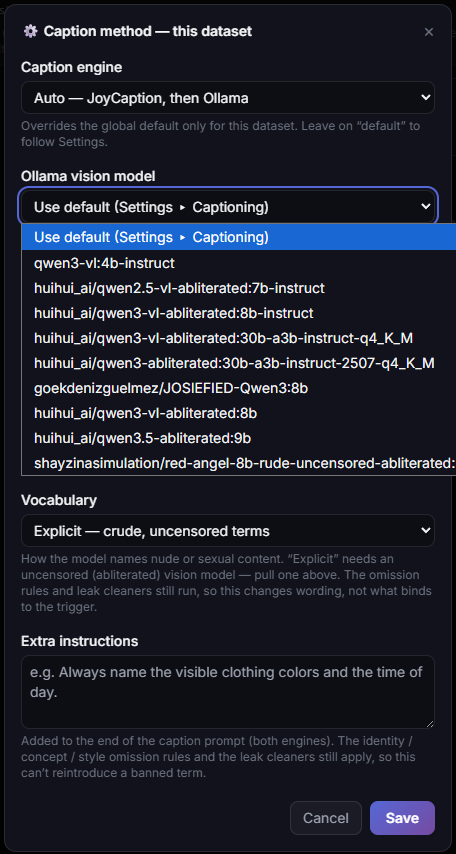
Match the caption style to the model family: natural-language prose for Krea 2, FLUX.1, FLUX.2 Klein, Z-Image and Qwen-Image 2.1, booru tags for SDXL, and either for Anima. The trigger word goes at the start of every caption; LoRA Dataset Studio (LDS) adds it on export and in the caption files a training run reads, so you never type it. Describe what should stay changeable, such as place, light, outfit and pose, and leave out what should stick to the trigger.
| Family | Caption style |
|---|---|
| Z-Image, Krea 2, FLUX.1, FLUX.2 Klein, Qwen-Image 2.1 | Prose sentences |
| SDXL | Booru tags |
| Anima | Either; its model card documents both |
Before a launch, LDS samples up to 12 kept captions and decides by majority whether the set is prose or tags. A mismatch stops the launch with two ways out: re-caption in the right mode, or force the training. The check exists for a reason: a prose-captioned SDXL LoRA produces disjointed images. Anima is never flagged.
On Character and Concept datasets, each exported caption reads trigger, caption. Write captions without the trigger and let LDS add it. Style datasets have no trigger: a style LoRA is always on, so its caption files contain the content description only. In the Test Studio, the Trigger word box, ticked by default, adds the trigger to your test prompts the same way.
A LoRA learns what is constant across your images and not described in the captions. So never describe what the person is; describe everything else.
- Weak:
myTrigger, a woman with long blonde hair and blue eyes, smiling. The caption already explains the appearance, so the LoRA learns almost nothing. - Better:
myTrigger, sitting at a café table, warm afternoon light, denim jacket, looking at the camera. Hair, face and skin stay unexplained and bind to the trigger.
Appearance in captions, in the options of the Captions panel, sets hair, makeup, facial hair and glasses to Omit, which binds the trait to the trigger, or Describe, which keeps it promptable. Hair is omitted by default. Face, eye colour, skin, age, gender and ethnicity always stay omitted. The identity-leak check flags any caption that describes an omitted trait; bring it to zero before training. Captions under about 8 words are too weak to isolate the identity, and identical captions teach nothing.
-
Engines: JoyCaption, which runs through ai-toolkit, or a local vision model served by Ollama or LM Studio. The default
autosetting tries JoyCaption first and lets the vision model cover the rest, so one batch can come back in two styles; pick one engine for the dataset to get a single voice. - Caption length: Standard, Concise (one short sentence, about 20 to 30 words) or Detailed. These are loose targets: on 18 portrait photos with the default vision model, the medians were 24.5, 87.5 and 126 words.
- Caption Lab runs up to four caption configurations on one image side by side and writes nothing until you keep one.
- A running caption pass can be stopped at any point; every caption written so far is kept.
-
Another captioner: use Export ZIP, caption the image and
.txtpairs in any tool, then bring them back with Import dataset (ZIP) or Import from folder. Images are matched instead of duplicated, and a non-empty caption written in LDS is never overwritten.
- Concept datasets can only be captioned in prose, so a concept on a booru-native SDXL checkpoint always trips the style check. Train concepts on a prose family, or force the launch and accept the quality loss.
- Dual captions, a long and a short caption per image, are off by default, work for local training only, and are not available on Krea 2 or Anima.
- Extra instructions cannot bring back an omitted trait; change its Appearance setting instead.